HP Employment Exchange Registration is a service that helps job seekers register their educational and personal details with the employment department. Registered candidates can keep their employment records updated and access various employment-related services offered by the government.
This guide explains who can apply, what documents are required, and how to complete the registration process.
What is HP Employment Exchange?
Employment Exchange Registration is a process where unemployed and job-seeking candidates submit their details to the employment department. The registration helps maintain a database of qualified candidates across different educational backgrounds and skill levels.

Candidates can update their qualifications and personal information whenever required.
Benefits of HP Employment Exchange Registration
Some important benefits include:
- Maintaining an official employment record
- Access to employment-related information
- Career guidance services
- Skill development opportunities
- Qualification updates and profile management
- Participation in employment-related programs
Eligibility for Registration
The following candidates can generally apply:
- Residents of Himachal Pradesh
- Freshers looking for employment opportunities
- Graduates and postgraduates
- ITI and diploma holders
- Skilled workers and professionals
- Candidates seeking government or private sector jobs
Documents Required
Applicants should keep the following documents ready:
Identity Proof
- Aadhaar Card
- Voter ID (if available)
Address Proof
- Domicile Certificate
- Residence Certificate
Educational Documents
- 10th Marksheet
- 12th Marksheet
- Diploma Certificate (if applicable)
- Degree Certificate (if applicable)
Additional Documents
- Passport-size Photograph
- Mobile Number
- Email Address
- Caste Certificate (if applicable)
HP Employment Exchange Registration
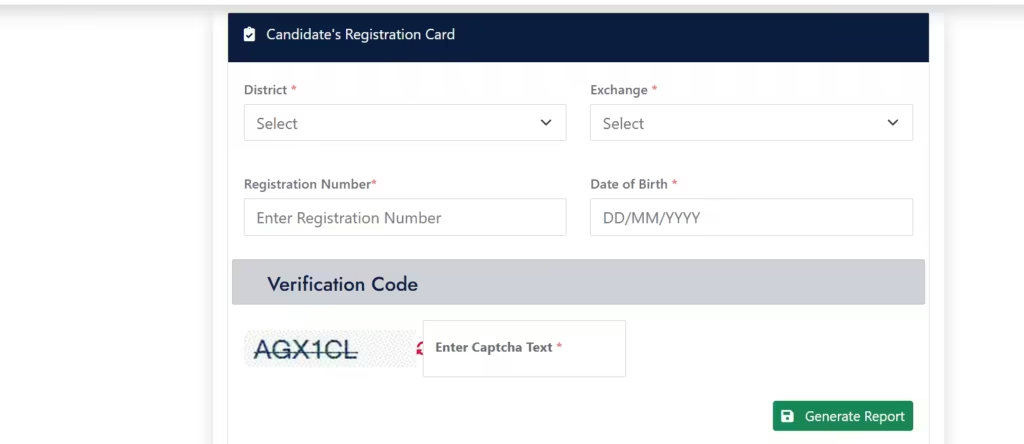
Step 1: Visit the Registration Portal
Open the official employment registration website or visit the nearest Employment Exchange Office.
- Click on Candidates Corner.
- Select Registration Card/Login.
Step 2: Fill Personal Details
Fill the following Details:
- Full Name
- Date of Birth
- Address
- Mobile Number
- Email Address
Step 3: Add Educational Qualifications
Provide details of your educational certificates and qualifications.
Step 4: Upload Documents
Upload the required documents in the prescribed format.
Step 5: Submit Application
Review all information carefully and submit the registration form.
Updating Your Profile
After registration, candidates should update their profile whenever there is a change in:
- Educational qualifications
- Mobile number
- Email address
- Residential address
- Employment status
Keeping information updated helps maintain an accurate employment record.
Registration Renewal
Employment registrations may require renewal after a specific period. Candidates should check official notifications regularly and complete renewal before the expiry date.
Timely renewal helps keep the registration active and updated.
snehagarla008@gmail.com
Kya ST SC or OBC ke candidate 50 years age hone ke bad b registration krba skte hai teacher bnne ke lia
Registration online hogi ya offline??
575